


Make a claim online or over the phone, with help along the way.

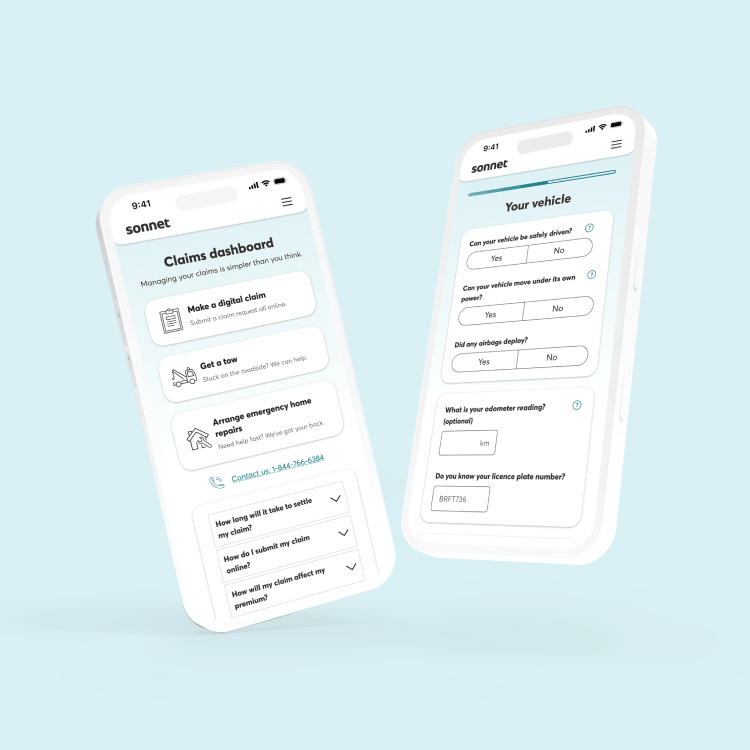
Our new online service simplifies claims - with the same 24/7 phone support
Because Sonnet’s a digital company, you can submit your claim online directly through your account or over the phone – the choice is yours. After submitting your claim, a dedicated member of our Claims team will work closely with you from start to finish to make your experience as simple and stress-free as possible. Our hassle-free service program guarantees the quality of your repairs. And with 24-hour emergency service, we’re here when you need us most.
Our claims process
Submit your home insurance claim quickly and easily online, or over the phone – our Claims team will be there to support you every step of the way. If you need to clean up quickly after an event, we’ll get an emergency services vendor to help out. We can also set you up with a pre-screened contractor, which simplifies the process of estimates and guarantees the work for 2 years.
Learn more about how to file a home insurance claim with Sonnet.
You can file your auto insurance claim online or over the phone, 24/7. Our Claims team will be there to support you from beginning to end. We can also help you find a local certified repair shop and set up your rental vehicle (if you’re covered). Plus, if you use one of our certified repair shops, body, part and paintwork is guaranteed as long as you own the vehicle.
Learn more about how to file an auto insurance claim with Sonnet.
Having a sick or injured pet can be very stressful. Filing your pet insurance claim takes just 3 easy steps:
- Download the claim form(s).
- Have your vet fill in the required sections.
- Submit the forms and receipts via your online account, by sending them in an email, or through regular mail.
Learn more about how to make a pet insurance claim.
Benefits of making a claim online
We take pride in being Canada’s first digital insurance company. Not only have we made your insurance easier to manage with 24/7 online access – you can report your home and auto claims online, too.
With online claims, you can:
- Submit your claim at any time, from anywhere
- Save your claim and return to it when you’re ready
- Request an emergency services vendor or certified auto repair shop
- Book a rental car at the time of your claim (if you’re covered)
- Chat live with our Claims team if you need help






Still have questions about claims?
Check out some of our frequently asked claims questions and blog content. Already filed a claim? Don’t worry, your assigned Claims team member will guide you through the process and answer all your questions.
Blogs

- At Home
Claims 101: What is proof of ownership?
Proof of ownership is any document that provides specific details about an item that was lost or damaged as part of your home insurance claim. Your insurer uses this to document that you owned the item and to properly compensate you for the loss. Learn more about proof of ownership and how to prepare it ahead of time.

- In Your Wallet
What is a claims guarantee and how does it work?
In the event of a claim, both you and your insurance company want the repairs to your home or car done right, on time and on budget. That’s why your insurer has created a network of pre-screened vendors and a claims guarantee to help make this happen. Learn more about how it benefits you.

- In Your Wallet
What is an insurance deductible and how does it work?
A deductible is the amount you pay before any insurance benefit is paid. Learn more about what insurance deductibles are and how they work.
Still have questions about claims?
Check out some of our frequently asked claims questions and blog content. Already filed a claim? Don’t worry, your assigned Claims team member will guide you through the process and answer all your questions.
Here’s how to report your claim online with Sonnet.
Heads up! Before you start to submit your claim, you’ll need to have certain information handy. This includes:
- Details and notes from the incident
- Documentation such as bills or receipts (for ambulance or fire truck costs, medical expenses, cleaning services, etc.)
- Contact information for everyone involved
To submit a digital claim:
1. Start your claim.
Click the "Start a digital claim" button.
2. Tell us when it happened.
Enter the date and time the incident occurred, as accurately as possible. If you weren’t around at the time of the incident, you can enter the time it was discovered.
3. Tell us what property or vehicle was impacted.
We’ll provide you with a list of vehicles and/or properties you have insured with us. Select the one that was impacted.
Note: There will also be options to select if you have injuries caused by a vehicle that was not yours (as a pedestrian or cyclist), or if your property was damaged or lost in a location outside of your home.
4. Enter your contact information.
You will then be asked to enter contact information so we can get in touch with you after you submit your claim. You’re also allowed to add another person as an additional contact to receive your claim details and help you if you need assistance.
Heads up! If you’re reporting a property claim and need emergency repairs, you’ll select your emergency services vendor during this step.
5. Tell us what happened.
Be as accurate as possible. Depending on the nature and complexity of your claim, we’ll ask about the people involved, any injuries to yourself or others, and the damages to your vehicle or home. This is also where you’ll upload any documents or photos you’d like to submit. The process may take five to ten minutes.
6. Review your claim.
Carefully review the information you entered. If you need to change anything, click “Edit” beside the section you wish to change.
7. Select your service and/or Certified repair shop for your car (if applicable).
This is where you can select a certified repair shop for your car from our list of quality vendors. If you’re eligible, you may also be asked to set up your rental car service or request an Uber voucher.
8. Submit your claim.
Whether it was through a live chat or directly via the online reporting form, after your claim is submitted it’s sent to a priority queue of digital Claims team members. An adjuster will review the details and call you within one business day. You can share additional details and pictures, or clarify any new information with this adjuster. They’ll also be able to answer any of your questions and tell you all you need to know about the next steps, what's needed from you, and what Sonnet will do to handle your claim.
We know claims can be stressful – and we’re here for you. Remember, you can always chat with one of our dedicated Claims team members if you have any questions. To do so, make sure you log into your account first.
You want your claim settled as quickly as possible – so do we! How long that takes depends on how severe or complex the loss is, whether or not you need a rental car or clean up service, and other steps that could be involved in your claim. Some claims can be wrapped up in a single phone call. Others might require us to bring in other claims experts.
You can speed things up by providing any necessary details or documents associated with the claim as quickly as possible.
Did you know? Reporting your claim online can speed things up! Some things like booking a rental car or choosing a repair shop can be done directly during the online reporting process. This will save you time and get you back up and running more quickly! After you submit your online claim, a member of our Claims team will call you in approximately one business day to discuss your claim and proceed with the next steps.
It really depends on your specific situation, past claims history and other factors. One impact could be that you wouldn’t qualify for our claims-free discount. The true impact of your claim on your premium won’t actually be known until renewal time.
Even though your premium is tailored to you, your situation, your coverages and your past claims, it’s always good to be informed as to why your premium might go up at renewal. Learn more why your home insurance premium or auto insurance premium could increase.
If you do have questions about your renewal, contact us. We can review your policy and go over the details with you.
At Sonnet, you can report your claim online or over the phone. We want you to get the help you need as quickly as possible. That’s why the more information you can give us up front, the better.
Before submitting your claim, make sure you’re familiar with the coverages you have on your policy. To view your policy, log into your account and click "My Policies" on the dashboard, and then click on the policy you want to view. See if you have coverage for the specific loss or event and check if there are any exclusions that aren’t covered.
You should have the following information handy (if applicable) when you’re reporting your claim:
- Your policy number (phone claims only – you won’t require this if you’re reporting your claim online)
- Photos
- Police reports
- Correspondence relating to the claimed event
- Names and contacts of any service providers you used to assist you
- Invoices for any out-of-pocket expenses
- Receipts for lost or damaged items
- Contact information, namely phone numbers where you can be reached

Are you a Sonnet customer?
Log in to chat so we can talk specifics.